10 Tips for Perfecting Your Job Interview Photos & Visual Presence (2025 Guide)
Article Body:
Introduction
In today's digital-first hiring landscape, your visual presence is as critical as your resume. From the professional headshot on your LinkedIn profile to your on-screen demeanor during a video interview, how you appear visually can significantly impact a recruiter's perception. While other guides offer generic advice, we will provide a comprehensive, actionable blueprint to master the visual elements of your job search, ensuring you make a lasting, positive impression.
Main Content
H2: Why Your Professional Image Matters More Than Ever
First impressions are formed in seconds. In a competitive job market, a polished and professional image can be the differentiator that captures a recruiter's attention. With over 98% of Fortune 500 companies using Applicant Tracking Systems (ATS) to filter resumes Jobscan, your online profiles—complete with photos—are often the first human touchpoint. This makes your visual brand a key component of a successful job search strategy.
H2: The Headshot Dilemma: A Picture's Worth a Thousand Words
Your headshot is your digital handshake. It must be professional, current, and authentic.
H3: The Great Debate: Photo on a Resume?
The answer depends heavily on geography and industry norms.
- United States/United Kingdom/Canada: Avoid it. Anti-discrimination laws and a focus on unbiased hiring mean photos on resumes are generally discouraged and can lead to unconscious bias.
- Germany/France/Most of Europe: Often expected. A professional photo is a standard part of a CV.
- Creative Industries (e.g., Acting, Modeling): Required. Your headshot is a core part of your submission.
H3: Your LinkedIn Profile Photo: An Absolute Must
A LinkedIn profile with a photo receives up to 21 times more profile views and 9 times more connection requests LinkedIn. It’s non-negotiable.
Comparison Table: Good vs. Bad Headshot
| Feature | Good Headshot (Do) | Bad Headshot (Don't) |
|---|---|---|
| Lighting | Soft, natural light facing you | Harsh shadows, backlighting |
| Background | Simple, uncluttered, neutral color | Distracting, messy, a selfie in a car |
| Attire | Professional, industry-appropriate | Casual t-shirt, party-wear, logos |
| Expression | Natural, confident smile | Overly serious, goofy, or a blank stare |
| Quality | High-resolution, sharp focus | Blurry, pixelated, cropped from a group |
H2: Mastering the Video Interview: Your Digital First Impression
The video interview is your modern-day screen test. Your on-screen presence is as important as your answers.
H3: Step-by-Step Guide to the Perfect Video Setup
- Frame Your Shot: Position the camera at eye level. Your head and shoulders should be in the frame, with a small amount of space above your head.
- Light Your Face: Face your primary light source (e.g., a window). Avoid sitting with a window behind you. A simple desk lamp or ring light can dramatically improve quality.
- Check Your Background: Your background must be professional and distraction-free. A tidy bookshelf, a plain wall, or a professional virtual background are excellent choices.
- Test Your Tech: Do a trial run to check your camera, microphone, and internet connection. Ensure your username is professional.
H3: Do's and Don'ts for Video Interview Body Language
- Do: Sit up straight, maintain eye contact with the camera (not the screen), and nod to show you are engaged.
- Don't: Fidget, slouch, or get distracted by notifications or other people in the room.
Call-to-Action (CTA)
A compelling visual presence gets you noticed, but a perfectly tailored resume gets you past the machines. While you focus on perfecting your professional image, let JobSeekerTools ensure your resume is optimized to beat the ATS. Our AI-powered platform analyzes your resume against any job description, providing instant feedback to help you land more interviews.
Conclusion
In the modern job hunt, your visual story matters. From a strategic headshot to a polished video interview presence, every detail contributes to the professional brand you project. By taking control of your visual narrative, you move beyond being just a name on a resume and become a memorable candidate poised for success.
Key Visual Guides
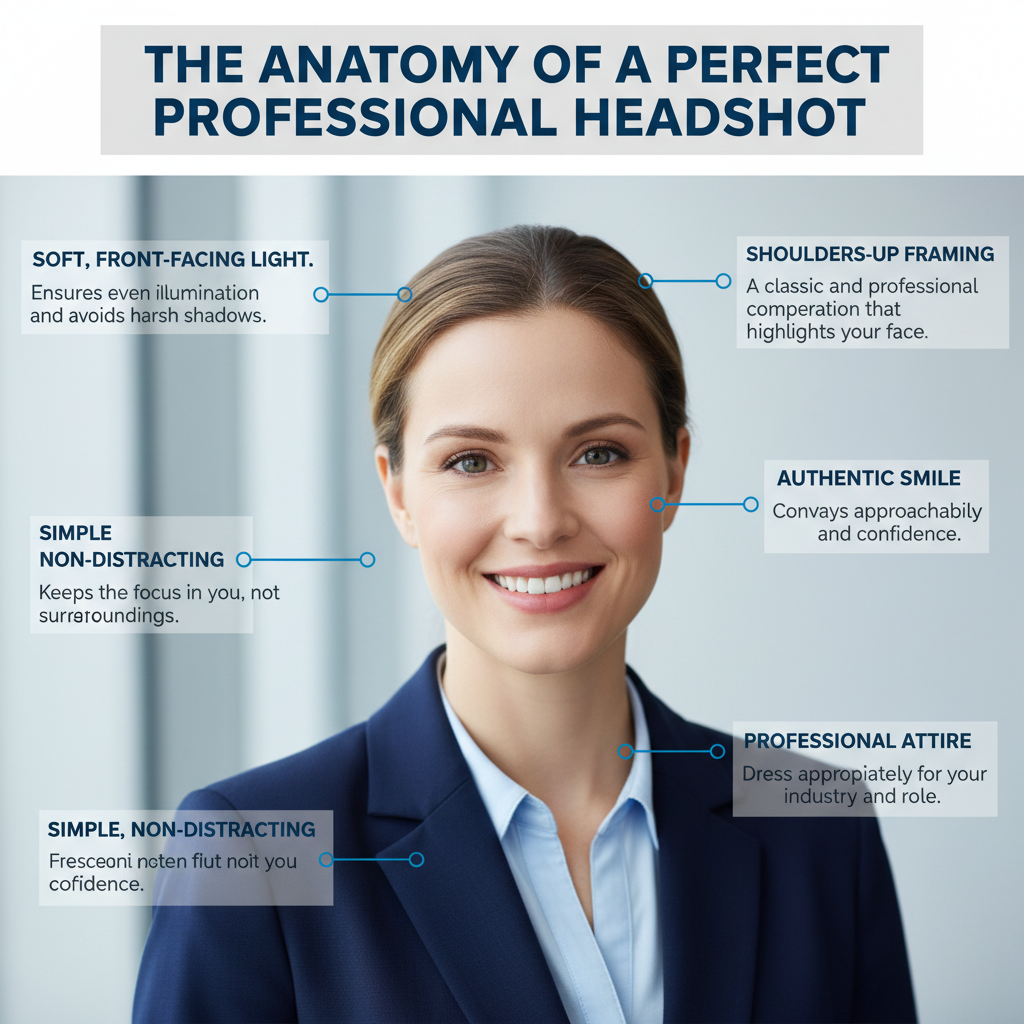
The Anatomy of a Perfect Professional Headshot
This infographic breaks down the key elements required for a great professional headshot, helping you make a strong first impression.
Key Elements:
- Soft, Front-Facing Light: Ensures even illumination and avoids harsh shadows.
- Simple, Non-Distracting Background: Keeps the focus on you, not your surroundings.
- Shoulders-Up Framing: A classic and professional composition that highlights your face.
- Authentic Smile: Conveys approachability and confidence.
- Professional Attire: Dresses you appropriately for your industry and role.
Infographic detailing the key elements of a professional headshot for job interviews, including lighting, background, and attire.
Good vs. Bad Video Interview Setup
This chart provides a side-by-side comparison of good and bad video interview setups to help you present yourself professionally.
Bad Setup:
- Dark Room/Backlighting: Person is in a dark room and backlit by a window, which obscures their face.
- Messy Background: The background is cluttered and unprofessional.
- Poor Camera Angle: The camera is angled up, creating an unflattering view.
Good Setup:
- Front-Facing Light: The person is well-lit from the front, ensuring their face is clearly visible.
- Eye-Level Camera: The camera is positioned at eye level, creating a natural and engaging connection.
- Clean Background: The background is simple and professional, keeping the focus on the candidate.
Comparison chart showing good versus bad setups for photos of job interviews conducted via video call, highlighting lighting and camera angle.
Frequently Asked Questions
Q1: Should I use a photo on my resume if I'm applying for a job in the United States?
A: No. It is strongly recommended to omit your photo from your resume for jobs based in the U.S., UK, and Canada. This is to help prevent unconscious bias in the hiring process. Recruiters will see your photo when they view your LinkedIn profile.
Q2: Can I take a professional-looking headshot with my smartphone?
A: Absolutely. Modern smartphones have excellent cameras. The key is to pay attention to the fundamentals: find a source of soft, natural light (like a window), use a simple and uncluttered background, and have a friend take the photo for a better angle. Avoid using the front-facing "selfie" camera if possible, as the rear camera is usually higher quality.
Q3: What is the single biggest visual mistake to avoid in a video interview?
A: Poor lighting. If the interviewer cannot see you clearly, it creates a significant barrier. Being backlit (sitting with a bright window or light behind you) is the most common and damaging lighting mistake, as it turns you into a silhouette. Always ensure your primary light source is in front of you.