The Ultimate Guide to the Perfect Woman's LinkedIn Profile Picture (2025)
SEO Title:
The Ultimate Guide to the Perfect Woman's LinkedIn Profile Picture (2025)
Meta Description:
Ready for a standout professional brand? This guide offers expert tips for a woman's LinkedIn profile picture that grabs recruiter attention. Learn the do's, don'ts, and secrets to a photo that radiates confidence and competence. Get noticed today!
Article Body:
Your Digital Handshake: Why Your LinkedIn Profile Picture is Crucial
First impressions are now digital. Before a recruiter reads your experience or a client reviews your proposals, they see your face. For a woman navigating the professional world, a strong LinkedIn profile picture isn't just a photo—it's a strategic tool. It conveys confidence, competence, and approachability in a single glance.
While other guides offer generic tips, this article is the definitive resource for women seeking to create a profile picture that is not only professional but also authentic and powerful. We'll go beyond the basics, providing a step-by-step framework to ensure your photo works as hard as you do.
The 7-Step Checklist for an Unforgettable Profile Picture
Forget blurry selfies or cropped vacation photos. Follow this checklist for a DIY headshot that looks polished and professional.
1. Master Your Lighting and Background
- Lighting: Natural light is your best friend. Position yourself facing a window to get soft, even light that minimizes shadows. Avoid harsh overhead lighting or direct sun, which can create unflattering glares.
- Background: Keep it simple. A solid, neutral-colored wall (light gray, white, or navy) or a subtly blurred-out office or outdoor environment works best. The focus should be entirely on you, not a distracting background.
2. Dress for the Role You Want
Your outfit should align with your industry's standards. When in doubt, a business casual approach is a safe bet.
- Tops: Opt for solid, rich colors. Jewel tones like emerald, sapphire, and ruby look great on camera. Avoid busy patterns or large logos.
- Necklines: A modest V-neck, crewneck, or a collared shirt are all excellent choices. Ensure it's something you'd comfortably wear to a client meeting or interview.
3. Find Your Power Pose
Body language speaks volumes. Your pose should exude confidence and openness.
- Angle: Position your body slightly to one side and turn your head toward the camera. This "three-quarters" pose is almost universally flattering.
- Posture: Sit or stand up straight, roll your shoulders back, and slightly lean in toward the camera to appear engaged and interested.
4. The Science of a Genuine Smile
A warm, genuine smile makes you seem more approachable and trustworthy. Studies show that a smile that engages the eyes (a "Duchenne" smile) is perceived as more authentic. Practice in a mirror until it feels natural. Think of a positive accomplishment or a happy memory right before you take the shot.
5. Technical Details: Crop, Resolution, and AI
- Resolution: Use the highest-resolution camera you have—your smartphone is likely perfect for this. A sharp, clear image is non-negotiable.
- Crop: Your photo should be cropped from the top of your shoulders to just above your head. Your face should fill about 60% of the frame.
- AI Enhancement: Don't be afraid to use modern tools. Simple edits like adjusting brightness, contrast, or even using an AI-powered photo enhancer can sharpen your image and make it pop.
6. The "No-Selfie" Rule (and How to Break It)
While having someone else take your photo is ideal to avoid the tell-tale "selfie arm," you can get a great shot alone. Use your phone's self-timer and prop it up on a stable surface. This mimics the distance and angle of a photo taken by someone else.
7. The Final Check: Does it Look Like You?
Authenticity is key. Your photo should be a recent and accurate representation of you. Over-editing or using a picture that's more than a few years old can create a disconnect when you meet someone in person.
DIY vs. Professional Headshot: Which is Right for You?
| Feature | DIY Headshot | Professional Headshot |
|---|---|---|
| Cost | Free | $150 - $500+ |
| Convenience | High (can do it anytime) | Low (requires scheduling) |
| Quality | Good to Great (with effort) | Excellent (guaranteed) |
| Best For | Students, recent grads, career changers | Executives, senior leaders, client-facing roles |
Do's and Don'ts for Your LinkedIn Picture
- Do: Use a recent, high-resolution photo.
- Do: Smile warmly and make eye contact with the camera.
- Do: Dress professionally and appropriately for your field.
- Don't: Use a photo with other people, pets, or distracting elements.
- Don't: Use a selfie with your arm visible or from a low angle.
- Don't: Use an overly filtered or edited photo that looks unnatural.
Supercharge Your Entire Profile
A fantastic profile picture opens the door, but the rest of your profile has to seal the deal. With over 75% of recruiters using LinkedIn to find candidates The Social Shepherd, your entire profile needs to be optimized. JobSeekerTools can analyze your resume and LinkedIn profile to ensure you're using the right keywords to attract recruiters and pass through Applicant Tracking Systems (ATS).
Conclusion
Your LinkedIn profile picture is your digital first impression and a critical element of your personal brand. By following these steps, you can create a powerful, professional, and authentic image that helps you stand out for all the right reasons. It’s not about vanity; it’s about presenting the best version of your professional self to the world.
Key Visual Guides
The Anatomy of a Perfect LinkedIn Profile Picture
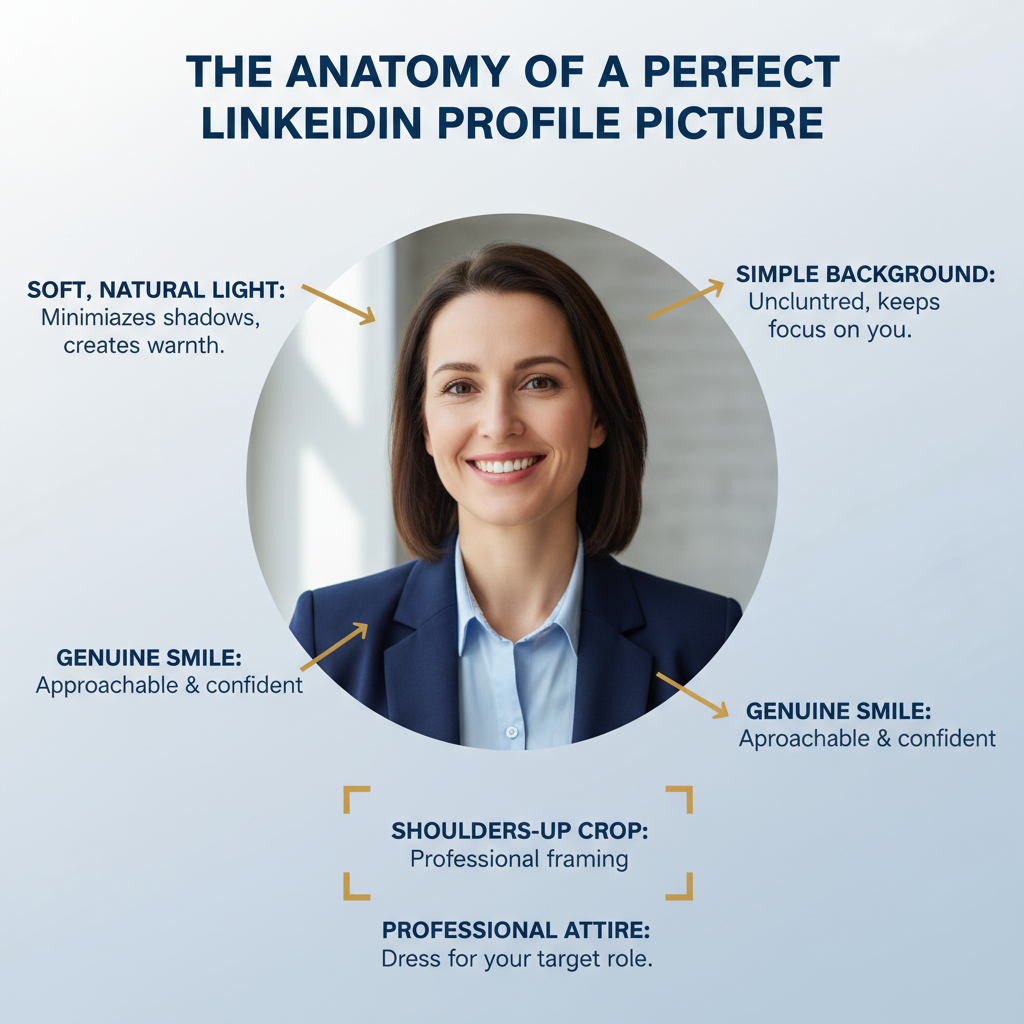 Image Description: Infographic detailing the key elements of a professional woman's LinkedIn profile picture, including lighting, background, and attire.
Frequently Asked Questions
Is it okay to use a black and white photo?
While artistic, color photos are generally preferred on LinkedIn as they feel more vibrant and personal. Black and white can sometimes be perceived as overly formal or dated, but if it aligns with your personal brand (e.g., you're a photographer), it can work.
How often should I update my profile picture?
You should update your photo every 2-3 years, or after any significant change in your appearance (e.g., new hairstyle, new glasses). Your picture should always be an accurate representation of how you look today.
Can I use a picture from a social event?
It's best to avoid it. Even if you crop everyone else out, pictures from weddings or parties often have unprofessional lighting and backgrounds. A dedicated photo session, even a 10-minute DIY one, shows you're more intentional about your professional brand.